Follows
Follows allow you to follow a series without the added effort of performing weekly searches, scouring websites and actually remembering exactly what you're following. When you follow a series, you can choose a preferred subbing group and release quality and also specify if you're interested in releases from other groups or with a different quality if such a release becomes available first. You even get your own dedicated RSS feeds for the series' you're following!
Follows are only available to registered users. (Free! and only takes a second!)
Creating a Follow
Creating a follow is done from the Add Follow page.
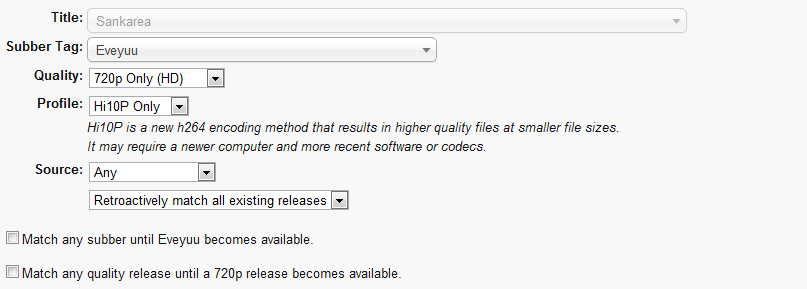
When creating a Follow you are asked to provide the following information:
- Title
- Select the series you want to follow. Sometimes a series appears more than once in this list with different names; we can resolve this issue as soon as we're aware of it, so send as an email and let us know.
- Subbing Tag
- Select the tag of the subbing group(s) you want to follow. Make sure you select the correct tag that the group is using for this title (sometimes groups use slightly different tags between shows!). If you don't care what group you get, choose Don't Care.
- Quality
- This is the quality you want. You can choose Don't Care if you don't care what quality you get. If you select 720p or 1080p, then only files that are marked with that resolution will be matched.
- Profile
- Use this option to select which profile you'd like to get.
Hi10P is a new h264 encoding method that results in higher quality files at smaller file sizes.
It may require a newer computer and more recent software or codecs.
If you set one of the Prefer options, then that profile will be given priority for matching. However if you select one of the Only options, then only releases that contain that profile in the file name will be matched. - Source
- If you only want releases from a certain source, select it here. Generally you'll use this option to target BluRay or DVD releases. Make sure you use it in conjuction with the Quality setting above to choose either 720p or 1080p.
Providing all that information can sometimes be difficult. Instead of filling it all in manually, you can auto-fill it by first finding releases you want to follow. Learn how below in the Choose Something to Follow section!
The selection box allows you to either retroactively match all existing releases or only match new releases. If you've already downloaded any episodes that are already released for a show you want to follow, you should select the second option.
The next two check boxes allow you to match files that aren't quite perfect until your preferred release becomes available. If you want to watch a show as soon as its released, but archive a better quality copy for later then use these options.
As you modify settings the text at the bottom will change to reflect how this follow will work.
Once you're finished you can click the Add Follow button to create your Follow.
Once you've created your Follow, any new releases will be matched against your preferences. If a match is found it will appear on your Follow list and your RSS feeds. Once a better match is found (better in comparison to your quality and subbing group preferences, or a release with a newer version) the old match will be replaced in your lists with the new match.
Choose Something to Follow
While you can go directly to the Add Follows page to add a follow; its often much easier to use search or by clicking on an anime title to find episodes of a show by a subber you want. Once you've found a file from a series and subber you'd like to follow, click the + button the right of that row (to expand its details) and then click the yellow follow button on the right.
This will take you straight to the Add Follows page with the title, subber, quality and profile already filled in for you!

In the example above, clicking follow will auto-fill:
Title: Zetman
Subber: Hatsuyuki-Tsuki
Quality: 720p Only (High Definition)
Profile: 8-bit Only
Source: Any
Just set the remaining few settings as per the Creating a Follow section above and you're off! Wasn't that easy?
This makes finding and creating follows super easy!
Editing a Follow
You can edit any of your Follows from the Follows List page. Simply click the edit button next to a Follow to go to the edit page.
The edit page is identical to the Add Follows page but when you click Edit Follow it will delete your old follow and create a new one with the new settings.
Deleting a Follow
You can delete any of your Follows from the Follows List page. Simply click the delete button next to a Follow to get rid of it.
Be careful! Once you delete a follow, all matches that follow will dissapear from your Follows page. Of course, you can always just create a new follow to get those matches back.